How to Check Load Balance in TNT Easily


 March 6, 2026 12:26 am
How to Check Load Balance in TNT Easily. If your mobile balance suddenly runs out in an emergency, it can create serious problems, and you may get stuck without being able to contact anyone. That is why it is very important to always stay informed about your remaining balance. Now, a common question comes to mind: How to check load balance in TNT?
Don’t worry, here you will find complete details about the TNT load. This article covers all the available methods for checking your TNT balance or remaining load.
Methods to TNT Check Load Balance
TNT gives you multiple ways to check your load balance. Here is a quick overview before diving into each one:
| Method | Tool/Code | Internet Required | Cost |
|---|---|---|---|
| USSD Code | *123# | No | Free |
| SMS | BAL to 214 | No | Small fee |
| GigaLife App | Mobile App | Yes | Free |
| Online Portal | my.smart.com.ph | Yes | Free |
| Voice Call | *888 / 15001 | No | Free / ₱1 |
| SIM Toolkit | TNT Menu | No | Free |
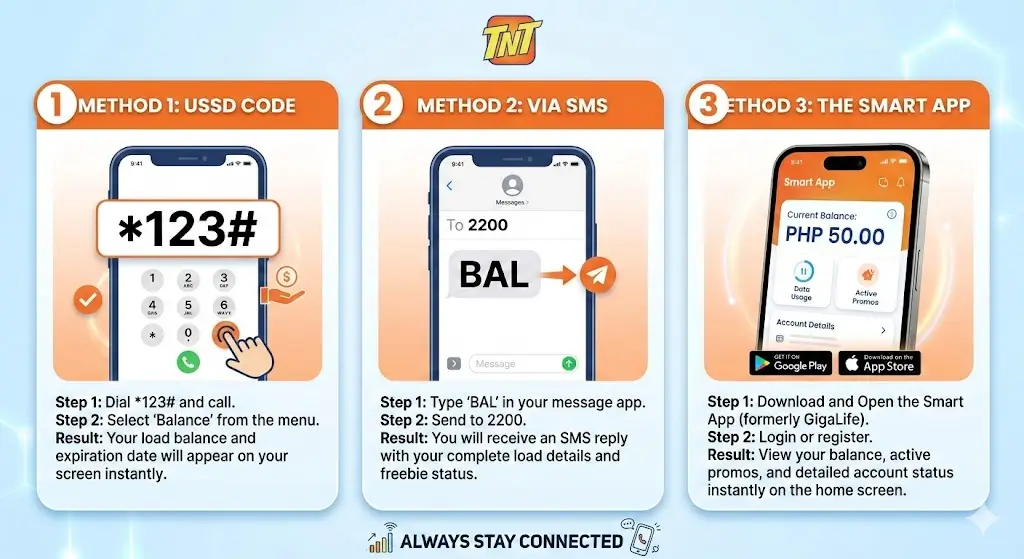
USSD Code
This is the fastest and easiest TNT load checking method. Below are the details to check the TNT balance via USSD:
- Open your mobile phone.
- Go to the dial pad.
- Dial *123#.
- Tap Call / Dial.
- Wait for the menu to appear.
- Look for the Option Number.
- Enter that number and tap Send.
- The balance menu will appear.
- Enter the balance Option Number to view your balance.
- Tap Send again.
Some users can directly see their balance in the USSD menu.
Note: This TNT balance checking method is free and works without the internet.
SMS Method
This is also an easy way to check the TNT SIM load. Below are the steps:
- Open the Messages app on your mobile phone and create a new message.
- Type BAL and send it to 214 using your TNT number.
- You will receive the complete balance and its expiry information via SMS.
Note: This is also a fast balance checking method but may require a small fee to proceed.
GigaLife / Smart App
You can view your TNT SIM balance using the GigaLife or Smart mobile app. The GigaLife app is also useful for getting details about active promos and expiry dates.
- Open the Play Store and download the GigaLife app.
- Open the app and log in to your account using your TNT number.
- Tap on Check Usage.
- Your screen will show the available load, activated promos, and their expiry dates.
Note: The GigaLife app shows real-time balance, but it requires a stable internet connection.
Online TNT Portal
You can check your data balance or load via the official web portal. Details are given below:
- Go to the official Smart portal.
- Log in to your account using your TNT number.
- The front page will show your complete data and load details.
Note: This method also provides balance and promo information but requires an internet connection.
Voice Call Inquiry
You also have the option to get your balance details via a voice call.
- Open the dial pad on your mobile phone and dial *888, or dial (02) 8888-1111 from a landline.
- Press the call button and follow the voice prompts.
- You can go to the balance inquiry option, where you can easily listen to all your load and promo details through the call.
Note: This is also a useful TNT load checking method and does not require the internet.
SIM Toolkit / TNT Menu
An often overlooked but simple built-in option on most phones.
- Open SIM Toolkit from your app drawer
- Navigate to TNT Menu → Balance Inquiry
- Your load balance information arrives via text
Important Tips
- Use online methods as they show the live available balance and detailed information.
- Use the USSD balance checking method during emergencies or when you have a weak internet connection.
- TNT SMS codes and numbers may vary slightly by region, as different regions have different codes.
- Sometimes the balance doesn’t update; restart your phone and check your balance again.
FAQs
Conclusion
Checking your TNT balance has never been easier. Whether you dial a USSD code, send an SMS, or open the GigaLife app, every method is simple and reliable. In an emergency, *123# remains the best option since it is completely free and works without internet. Make it a habit to check your balance regularly so you are never caught off guard. Choose whichever method suits you best and stay connected at all times!